In this tutorial we'll build a small Node.js tool that takes a place name, like “Kek Lok Si Temple”, and replies with the nearest bus stop and the next live buses. Then we'll turn it into an MCP tool, so an AI assistant can answer the same question.
How it works
That's the whole trick. The core of it, src/transit.js, is 188 lines with comments.
What you need
- Node.js 22.9 or newer. It can load your keys from a
.envfile by itself, so there's no extra package for that. - A SerpApi key. ; the free plan gives you 250 searches a month, plenty for this.
- A Malaysia Transit API key. It's free from the .
Each lookup uses one SerpApi search and one Malaysia Transit API call.
Step 1: Set up the project
mkdir serpapi-malaysia-transit && cd serpapi-malaysia-transit
npm init -y
npm pkg set type=module
npm pkg set scripts.start="node --env-file-if-exists=.env index.js"
npm install serpapi
Keep your keys out of the code. Put them in a .env file next to package.json:
SERPAPI_API_KEY=your-serpapi-key
MALAYSIA_TRANSIT_API_KEY=your-malaysia-transit-key
And keep that file out of Git, with a .gitignore:
node_modules/
.env
The start script runs Node with --env-file-if-exists=.env, which puts both keys in process.env before your code runs.
Step 2: Find the place with SerpApi
SerpApi's returns the same results you'd see on Google Maps, as clean JSON. Set engine to google_maps and type to search.
One catch: lots of places share a name. To make sure “Komtar” means the one in Penang, add the area to the query and pass ll, a GPS position and zoom level that centres the search:
import { getJson } from "serpapi";

const json = await getJson({
  engine: "google_maps",
  type: "search",
  q: "Kek Lok Si Temple, Penang",
  ll: "@5.4141,100.3288,11z", // centre the search on George Town
  hl: "en",
  api_key: process.env.SERPAPI_API_KEY,
});

// A precise search returns one place; a broad one returns a list.
const place = json.place_results ?? json.local_results?.[0];
const { latitude, longitude } = place.gps_coordinates;
Note the two shapes. When Google Maps is sure which place you mean, SerpApi returns a single place_results object. When it isn't, you get a local_results list. Handling both keeps the tool from failing on precise names.
You also get title, address, rating and reviews for free, which makes the final answer friendlier.
Step 3: Ask Malaysia Transit for live buses
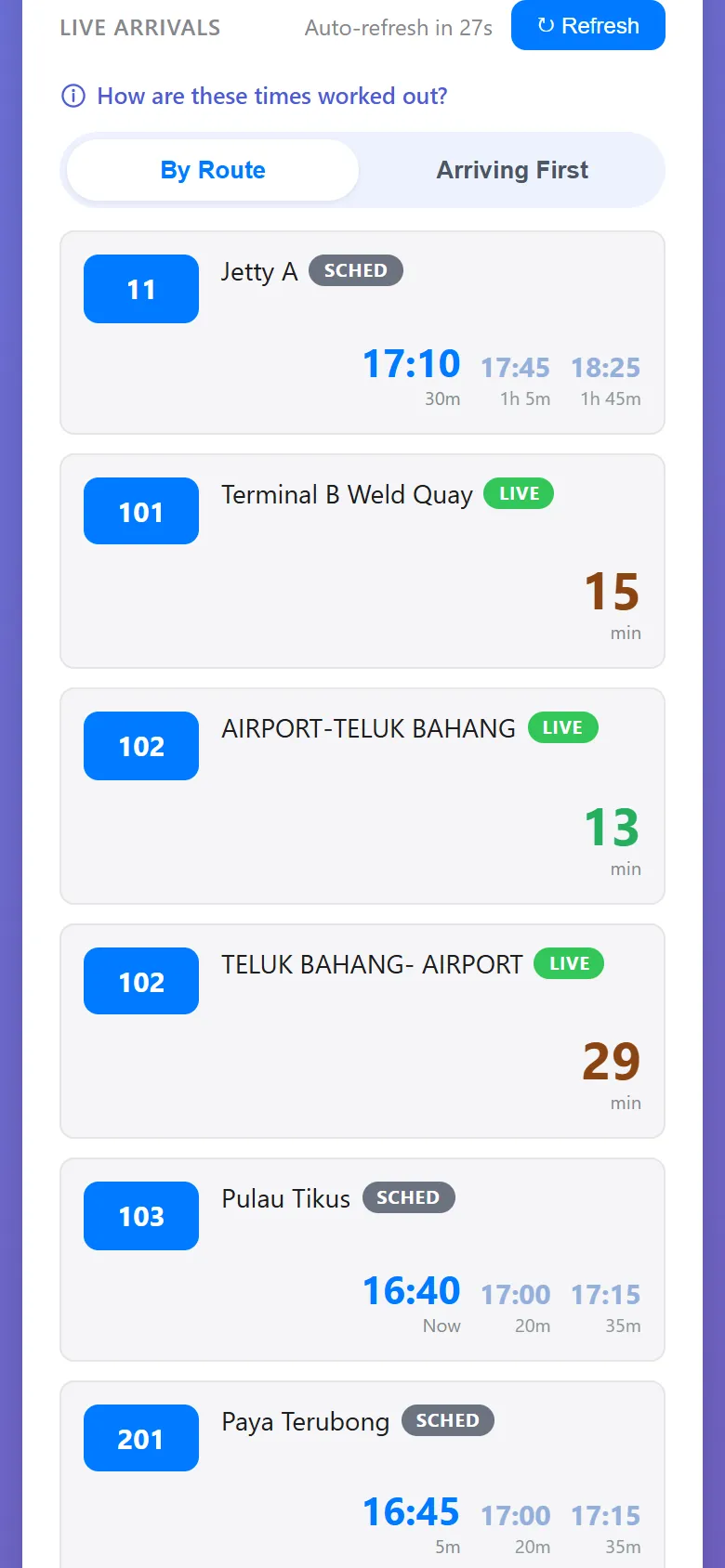
The covers buses, trains and ferries across 13 areas of Malaysia. Its stops/nearby/arrivals endpoint takes coordinates and returns the nearest stops, plus live arrivals at the closest one. The key goes in the X-API-Key header:
const url = new URL("https://malaysiatransit.techmavie.digital/api/stops/nearby/arrivals");
url.search = new URLSearchParams({
  lat: latitude,
  lon: longitude,
  area: "penang",
  radius: 0.5, // kilometres
});

const response = await fetch(url, {
  headers: { "X-API-Key": process.env.MALAYSIA_TRANSIT_API_KEY },
});
const { stops, nearestStop, arrivals } = await response.json();
The response has three parts:
stops: up to three nearby stops, with names and coordinatesnearestStop: the one the arrivals are forarrivals: up to ten buses, soonest first, each withrouteShortName,destinationandetaMinutes
Step 4: Put it together
The finished src/transit.js wraps both calls in one function, findBusesNearPlace(place, area). It works out how far each stop is from the place, in a straight line, and formatAnswer() turns the result into plain text. A small index.js makes it a command:
npm start -- "Kek Lok Si Temple" --area penangHere's what it printed on 22 November 2026. Live times will be different when you run it:
Kek Lok Si Temple (4.4 stars, 15,511 reviews)
Kek Lok Si Temple, 86s, Jln Balik Pulau, 11500 Ayer Itam, Pulau Pinang, Malaysia

Nearest stop: Klinik Desa Paya Terubong, 442 m away
Next buses:
  - 201 (JETI - PAYA TERUBONG - JETI): 11, 30, 33 and 35 min
Other stops nearby: Ambank Paya Terubong (477 m)
Real data needed three small fixes in formatAnswer():
- The same stop twice. Stops on opposite sides of a road can share a name, sometimes with a trailing dot. The tool keeps one entry per name, the closest.
- A busy route. Six arrivals on route 201 read better as one line with a list of times.
- Missing destinations. When a trip has no headsign, the API says “Unknown”, so the tool falls back to the route's full name.
Add --json to see the raw data, if you want to build something on top of it. The whole project is , and here are both files in full:
src/transit.js (188 lines)
/**
 * Find live buses near any place in Malaysia, in two calls:
 *
 *   1. SerpApi's Google Maps API turns a place name ("Kek Lok Si Temple") into
 *      coordinates, plus its address and rating.
 *   2. The Malaysia Transit API returns the nearest bus stops to those
 *      coordinates, with live arrival times.
 *
 * Both keys come from environment variables (see .env.example), never from code.
 */
import { getJson } from "serpapi";

const TRANSIT_API = "https://malaysiatransit.techmavie.digital/api";

/**
 * Malaysia Transit's service areas. The rough city centre biases the Google Maps
 * search so "Komtar" finds the one in Penang, not one somewhere else.
 */
export const AREAS = {
  "klang-valley": { name: "Kuala Lumpur", ll: "@3.1390,101.6869,11z" },
  penang: { name: "Penang", ll: "@5.4141,100.3288,11z" },
  kangar: { name: "Kangar", ll: "@6.4414,100.1986,12z" },
  "alor-setar": { name: "Alor Setar", ll: "@6.1248,100.3678,12z" },
  "kota-bharu": { name: "Kota Bharu", ll: "@6.1254,102.2381,12z" },
  "kuala-terengganu": { name: "Kuala Terengganu", ll: "@5.3302,103.1408,12z" },
  melaka: { name: "Melaka", ll: "@2.1896,102.2501,12z" },
  johor: { name: "Johor Bahru", ll: "@1.4927,103.7414,12z" },
  kuching: { name: "Kuching", ll: "@1.5535,110.3593,12z" },
  ipoh: { name: "Ipoh", ll: "@4.5975,101.0901,12z" },
  seremban: { name: "Seremban", ll: "@2.7258,101.9424,12z" },
  kuantan: { name: "Kuantan", ll: "@3.8077,103.3260,12z" },
};

/** Reads a required environment variable, with a clear message if it's missing. */
function requireEnv(name) {
  const value = process.env[name];
  if (!value) {
    throw new Error(`${name} is not set. Copy .env.example to .env and add your key.`);
  }
  return value;
}

/**
 * Step 1: find the place with SerpApi's Google Maps API.
 * Returns null when Google Maps finds nothing with coordinates.
 */
export async function findPlace(query, areaId) {
  const area = AREAS[areaId];
  const params = {
    engine: "google_maps",
    type: "search",
    q: area ? `${query}, ${area.name}` : query,
    hl: "en",
    api_key: requireEnv("SERPAPI_API_KEY"),
  };
  if (area) params.ll = area.ll;

  const json = await getJson(params);

  // A precise search returns one place (place_results); a broad one returns a list (local_results).
  const place = json.place_results ?? json.local_results?.[0];
  if (!place?.gps_coordinates) return null;

  return {
    name: place.title,
    address: place.address ?? null,
    rating: place.rating ?? null,
    reviews: place.reviews ?? null,
    lat: place.gps_coordinates.latitude,
    lon: place.gps_coordinates.longitude,
  };
}

/**
 * Step 2: ask the Malaysia Transit API for the nearest stops and live arrivals.
 * radiusKm is in kilometres; 0.5 (500 m) is the API's default.
 */
export async function nearbyArrivals(lat, lon, areaId, radiusKm = 0.5) {
  const url = new URL(`${TRANSIT_API}/stops/nearby/arrivals`);
  url.search = new URLSearchParams({ lat, lon, area: areaId, radius: radiusKm });

  const response = await fetch(url, {
    headers: { "X-API-Key": requireEnv("MALAYSIA_TRANSIT_API_KEY") },
  });
  if (!response.ok) {
    throw new Error(`Malaysia Transit API returned ${response.status}: ${await response.text()}`);
  }
  return response.json();
}

/** Walking-scale distance in metres between two points (haversine formula). */
export function metresBetween(a, b) {
  const toRad = (deg) => (deg * Math.PI) / 180;
  const dLat = toRad(b.lat - a.lat);
  const dLon = toRad(b.lon - a.lon);
  const h = Math.sin(dLat / 2) ** 2 + Math.cos(toRad(a.lat)) * Math.cos(toRad(b.lat)) * Math.sin(dLon / 2) ** 2;
  return 6371000 * 2 * Math.asin(Math.sqrt(h));
}

/** Both steps together: place name in, nearest stops and next buses out. */
export async function findBusesNearPlace(query, areaId = "penang") {
  const place = await findPlace(query, areaId);
  if (!place) return { query, areaId, place: null, stops: [], arrivals: [] };

  const transit = await nearbyArrivals(place.lat, place.lon, areaId);
  const stops = (transit.stops ?? []).map((stop) => ({
    name: stop.stop_name,
    metres: Math.round(metresBetween(place, { lat: Number(stop.stop_lat), lon: Number(stop.stop_lon) })),
  }));

  return { query, areaId, place, nearestStop: transit.nearestStop?.stop_name ?? null, stops, arrivals: transit.arrivals ?? [] };
}

/** Turns a result into a short answer a person (or an AI assistant) can read. */
export function formatAnswer(result) {
  if (!result.place) {
    return `Google Maps couldn't find "${result.query}" in ${AREAS[result.areaId]?.name ?? result.areaId}. Try a more specific name.`;
  }

  const { place, arrivals, nearestStop } = result;
  const stops = uniqueStops(result.stops);
  const lines = [];
  const rating = place.rating ? ` (${place.rating} stars${place.reviews ? `, ${place.reviews.toLocaleString("en")} reviews` : ""})` : "";
  lines.push(`${place.name}${rating}`);
  if (place.address) lines.push(place.address);

  if (stops.length === 0) {
    lines.push("", "No bus stops within 500 m of this place.");
    return lines.join("\n");
  }

  const nearest = stops[0];
  lines.push("", `Nearest stop: ${cleanName(nearestStop ?? nearest.name)}, ${nearest.metres} m away`);

  if (arrivals.length === 0) {
    lines.push("No live buses due there in the next hour.");
  } else {
    lines.push("Next buses:");
    for (const group of groupByRoute(arrivals).slice(0, 4)) {
      const label = group.destination ? `${group.route} (${group.destination})` : group.route;
      lines.push(`  - ${label}: ${listMinutes(group.minutes.slice(0, 4))}`);
    }
  }

  const others = stops.slice(1).map((stop) => `${stop.name} (${stop.metres} m)`);
  if (others.length > 0) lines.push(`Other stops nearby: ${others.join(", ")}`);

  return lines.join("\n");
}

/** Stop names sometimes differ only by a trailing dot (often the stop across the road). */
function cleanName(name) {
  return String(name).trim().replace(/[.\s]+$/, "");
}

/** One entry per stop name, keeping the closest. Stops arrive sorted by distance. */
function uniqueStops(stops) {
  const seen = new Set();
  return stops
    .map((stop) => ({ ...stop, name: cleanName(stop.name) }))
    .filter((stop) => !seen.has(stop.name.toLowerCase()) && seen.add(stop.name.toLowerCase()));
}

/** Groups arrivals by route and destination, so a busy route reads as one line. */
function groupByRoute(arrivals) {
  const groups = new Map();
  for (const bus of arrivals) {
    const destination = destinationOf(bus);
    const key = `${bus.routeShortName}|${destination}`;
    if (!groups.has(key)) groups.set(key, { route: bus.routeShortName, destination, minutes: [] });
    groups.get(key).minutes.push(bus.etaMinutes);
  }
  return [...groups.values()];
}

/** The API says "Unknown" when a trip has no headsign; fall back to the route's long name. */
function destinationOf(bus) {
  const known = (value) => value && value !== "Unknown";
  if (known(bus.destination)) return bus.destination;
  if (known(bus.routeLongName)) return bus.routeLongName;
  return null;
}

/** [11, 30, 33] → "11, 30 and 33 min" */
function listMinutes(minutes) {
  const text = minutes.length > 1 ? `${minutes.slice(0, -1).join(", ")} and ${minutes.at(-1)}` : `${minutes[0]}`;
  return `${text} min`;
}
index.js (40 lines)
/**
 * Command line: find live buses near a place.
 *
 *   npm start -- "Kek Lok Si Temple" --area penang
 *
 * The area defaults to penang. Run with --help to list all areas.
 */
import { parseArgs } from "node:util";
import { AREAS, findBusesNearPlace, formatAnswer } from "./src/transit.js";

const { values, positionals } = parseArgs({
  allowPositionals: true,
  options: {
    area: { type: "string", default: "penang" },
    json: { type: "boolean", default: false },
    help: { type: "boolean", default: false },
  },
});

const place = positionals.join(" ").trim();

if (values.help || !place) {
  console.log('Usage: npm start -- "<place name>" [--area <area>] [--json]');
  console.log(`Areas: ${Object.keys(AREAS).join(", ")}`);
  process.exit(place || values.help ? 0 : 1);
}

if (!AREAS[values.area]) {
  console.error(`Unknown area "${values.area}". Pick one of: ${Object.keys(AREAS).join(", ")}`);
  process.exit(1);
}

try {
  const result = await findBusesNearPlace(place, values.area);
  // --json prints the raw result, handy when building on top of it.
  console.log(values.json ? JSON.stringify(result, null, 2) : formatAnswer(result));
} catch (error) {
  console.error(error.message);
  process.exit(1);
}
Bonus: make it an MCP tool
The Model Context Protocol (MCP) lets AI assistants call tools like this one. Add the official SDK, and zod to describe the tool's inputs:
npm install @modelcontextprotocol/sdk zodThen it's one registerTool call, in a new mcp-server.js:
/**
 * Bonus: the same lookup as an MCP tool, so an AI assistant can answer
 * "how do I get to Kek Lok Si by bus?" with live data.
 *
 * It talks MCP over stdio. Add it to your MCP client's config (see README.md),
 * with SERPAPI_API_KEY and MALAYSIA_TRANSIT_API_KEY in that config's "env".
 */
import { McpServer } from "@modelcontextprotocol/sdk/server/mcp.js";
import { StdioServerTransport } from "@modelcontextprotocol/sdk/server/stdio.js";
import { z } from "zod";
import { AREAS, findBusesNearPlace, formatAnswer } from "./src/transit.js";

const server = new McpServer({ name: "buses-near-place", version: "1.0.0" });

server.registerTool(
  "find_buses_near_place",
  {
    title: "Find live buses near a place in Malaysia",
    description:
      "Finds a place with Google Maps (via SerpApi), then lists the nearest bus stops and the next live " +
      "arrivals there (via the Malaysia Transit API). Use it for questions like 'how do I get to X by bus?'.",
    inputSchema: {
      place: z.string().min(2).describe("A place name, e.g. 'Kek Lok Si Temple' or 'Pavilion Kuala Lumpur'"),
      area: z
        .enum(Object.keys(AREAS))
        .default("penang")
        .describe("Malaysia Transit service area the place is in"),
    },
  },
  async ({ place, area }) => {
    try {
      const result = await findBusesNearPlace(place, area);
      return { content: [{ type: "text", text: formatAnswer(result) }] };
    } catch (error) {
      // Report the problem to the assistant instead of crashing the server.
      return { content: [{ type: "text", text: `Lookup failed: ${error.message}` }], isError: true };
    }
  },
);

await server.connect(new StdioServerTransport());
Add it to your assistant's MCP config, with your two keys in its env. In Claude Desktop, that looks like this:
{
  "mcpServers": {
    "buses-near-place": {
      "command": "node",
      "args": ["/full/path/to/serpapi-malaysia-transit/mcp-server.js"],
      "env": {
        "SERPAPI_API_KEY": "your-serpapi-key",
        "MALAYSIA_TRANSIT_API_KEY": "your-malaysia-transit-key"
      }
    }
  }
}
Now “how do I get to Kek Lok Si by bus?” gets a real, live answer instead of a guess. Here's the tool answering for Pavilion Kuala Lumpur:
Pavilion Kuala Lumpur (4.6 stars, 64,059 reviews)
168, Jln Bukit Bintang, Bukit Bintang, 55100 Kuala Lumpur, Wilayah Persekutuan Kuala Lumpur, Malaysia

Nearest stop: KL86 MRT BUKIT BINTANG/HSBC, 277 m away
Next buses:
  - 400 (Damai Perdana ~ Hab Pasar Seni via Bukit Bintang): 42 min
Other stops nearby: RAJA CHULAN (340 m), BUKIT BINTANG (363 m)
Where to take it next
- Opening hours. SerpApi returns them too, so you could warn people when a place is about to close.
- Other areas. Swap
penangforklang-valley,johoror any other area in the code'sAREASlist. - The whole journey. The Malaysia Transit API also has a journey planner and a fare calculator.